

MT4 · MT5 · All brokers · Multi-account
All your MetaTrader accounts,
EAs and backtests,
in one place.
FX Live brings your MT4 and MT5 accounts from every broker onto a single page, tracks every EA and magic number, and helps you build better portfolios with Portfolio Lab.
✓ Free · ✓ No credit card · ✓ 100% private data
- MetaTrader 4
- MetaTrader 5
- Works with any broker
- Sync every 5 min (60 s on request)
- Tracking by EA and magic number
- Telegram and email alerts
- Email recaps: daily, weekly, monthly
- Portfolio Lab
- Setfile Editor
- Privacy mode
- 100% private data
- Completely free

Up and running in 5 minutes
Three steps, then your accounts update on their own.
-
1
Create your account
Free, no credit card: an email address is all it takes.
-
2
Install the Stats Export EA
Drop it on a chart in each MT4 or MT5 terminal. It sends your data with your personal key, never your broker credentials. Installation guide →
-
3
Everything is there
Your accounts show up and update automatically, every 5 minutes.
Track, analyse, optimise
A complete platform, designed by and for MT4/MT5 traders.
Track
All your accounts and brokers, on a single page.
- Balance, equity, daily, weekly, monthly and yearly gains
- Open positions across all your accounts
- Email and Telegram alerts when an EA goes silent
- Email recaps: daily, weekly, monthly
- Designed for mobile
Analyse
Every EA, every magic number, every position.
- Named EAs and magic numbers, sorted into categories
- History filtered by pair, magic or comment
- Deposits, withdrawals and fees kept apart from P/L
- Detailed statistics by period
Optimise
Tools to decide what to keep and what to cut.
- Portfolio Lab: backtests and live history
- Correlation, calendar, position list
- Setfile Editor for your .set files
- Usable without an account
All your accounts, one page
No more juggling between MetaTrader apps. FX Live gathers the balance, equity and gains of every account, across all your brokers: your overall position at a glance, on desktop and mobile.
- Daily / weekly / monthly / yearly gains
- MT4 and MT5 on the same screen
- Chart filtered by account, portfolio or EA
- Privacy mode: amounts hidden in one click, percentages stay
Every EA tracked, across all your accounts
Name your magic numbers and group them into EAs, even when they run on several accounts or brokers. See at a glance which EA pays and which one lags, and open it in Portfolio Lab in one click.
- Named magic number database
- Consolidated performance per EA, across accounts
- Categories and archiving
- Magic number filter on every view
Build better portfolios
Import your MT5 backtest reports, or start from your live EAs. Portfolio Lab computes the combined curve and key ratios, measures the correlation between strategies, and breaks returns down by calendar and position by position. Everything is computed in your browser.
- MT5 backtests and live history, combined
- Profit Factor, drawdown, Sharpe, Sortino, Calmar
- Correlation matrix, calendar, positions
- No account needed for your backtests
Warned as soon as an EA stops
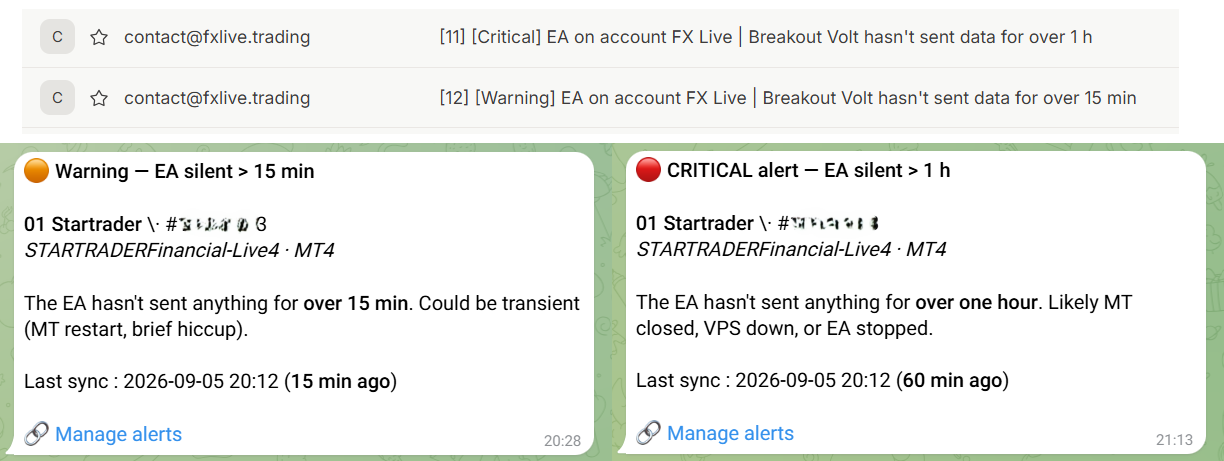
A crashed terminal, a rebooted VPS, a lost connection: FX Live warns you by email or Telegram when an account stops sending its data, before it costs you.
- Email and/or Telegram
- Enabled account by account
- Two levels: late, then stopped
Free tools, no sign-up
Try them right now: no account needed.

Load your MT5 backtest reports and build a portfolio: combined curve, ratios, correlation, calendar and positions. Your files never leave your browser.
Try Portfolio Lab →
Open and edit your .set files in the browser: several files at once, switches for options, UBS 7.6 reformatting, renaming from the comment.
Try Setfile Editor →Your data stays yours
A dedicated database
Your data is stored in a separate database, reachable only from your account.
No broker credentials
The EA sends your data with a personal key. We never ask for your MetaTrader passwords.
Nothing public
No public profile, no leaderboard, no resale. Nothing is shared without your consent.
Always improving
FX Live gets better every week. The latest updates:
Portfolio Lab 2.1: share your analyses and comparisons, and correlations that speak
An EA portfolio is something you discuss: with a friend, on Discord, with an EA's creator. Until now it took screenshots. With Portfolio Lab 2.1, a link is enough — and the correlations tab finally…
October 28, 2026New: the economic calendar, in your time zone and on your Telegram
A Fed or ECB release can move your EAs in seconds. FX Live's new economic calendar shows the whole week at a glance, Monday to Friday, and keeps only what matters to you. It is open to everyone, fr…
October 24, 2026Portfolio Lab 2.0: Live vs Backtests vs Signals vs Brokers
Does your EA do live what it promised in its backtest? Does your account really copy the signal you follow? And at which broker does your strategy run best? Portfolio Lab 2.0 answers all three with…
Frequently asked questions
Yes. FX Live is completely free: no subscription, no credit card. An account tracks up to 10 active MetaTrader accounts; if you need more, just write to us.
You install the FX Live Stats Export Expert Advisor (MT4 and MT5) on a chart in your terminal. It sends your account balance, positions and history with your personal API key. No broker credentials are asked for or shared. The installation guide walks you through each step.
Every 5 minutes by default. If you need faster updates, every 60 seconds is available on request.
Every MetaTrader 4 and MetaTrader 5 broker: as long as you have an MT4 or MT5 terminal, you can connect your account. Vantage, IC Markets, Pepperstone, XM, RoboForex and hundreds of others.
Yes. Your data is stored in a dedicated database and can only be accessed from your account. FX Live creates no public profile or leaderboard, and sells nothing.
Yes, with Portfolio Lab: import your MT5 strategy tester reports (add the .set files and logs for exact trade attribution) and combine them, with each other or with your live EAs. Everything is computed in your browser, your files are sent nowhere, and no account is needed.
FX Live runs in your phone's browser, with an interface designed for mobile. You can add it to your home screen and open it like an app.
Those services are mostly built to publish and compare performance. FX Live is built to run your own accounts: a clear view of all your accounts and brokers, tracking by EA and magic number, alerts, and analysis tools such as Portfolio Lab. And everything stays private.
All your MetaTrader accounts,
at a glance.
Free. Set up in 5 minutes.


